

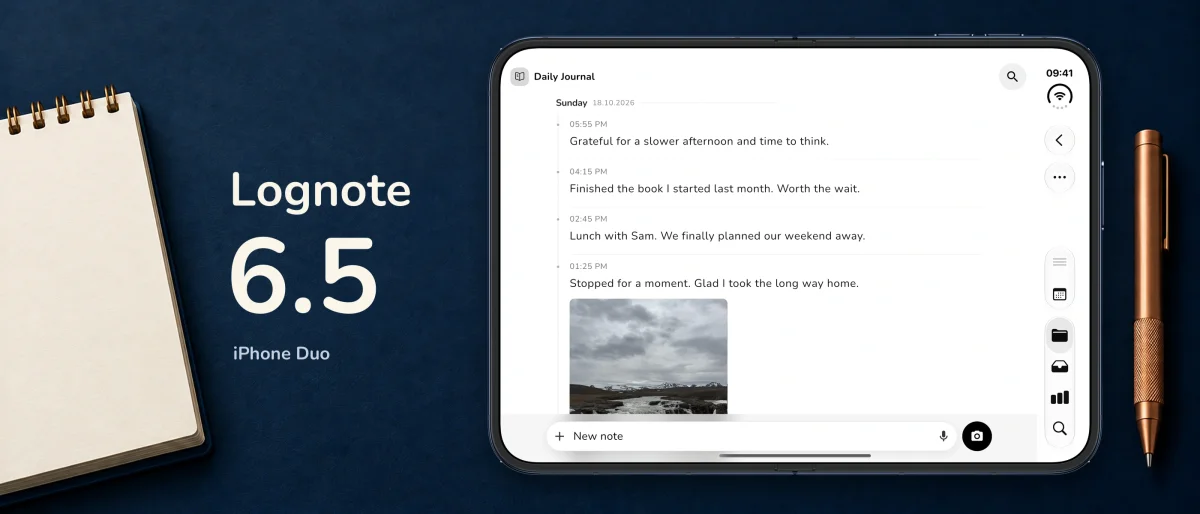
iPhone Duo, more reliable sync and a lighter web app
v6.5.0
FunktionenVerbesserungenFehlerbehebungen
Lognote 6.5 brings an adaptive iPhone Duo layout, date-only display, clearer shared groups and on-demand loading in the web app.
All platforms
- Date without time: hide the time on notes while keeping the date visible.
- Choose whether to show the time for all notes or individual groups.
- View active invitation links for shared groups directly.
- Check when invitation links expire, share them again or revoke individual links.
- Media that has not downloaded yet is easier to recognise in shared notes.
- Photos and files download more reliably after changes.
- Interrupted transfers are retried more reliably.
- Sync status better reflects media that has not finished downloading.
- Local copies and files are kept when you leave a shared group.
- Unsynced changes are checked before you leave a group.
- Sharing and member actions show when they are in progress and prevent repeated taps.
- Shared-group error messages are clearer and more consistent.
- Saved link previews appear more consistently, with fewer layout shifts.
- The links overview recognises Markdown links and URLs containing brackets more reliably.
- Search handles quick navigation and closing its view more reliably.
- Backup restoration is better coordinated with ongoing sync.
iOS only
- Optimised for iPhone Duo: groups and notes appear side by side when there is enough space.
- The interface adapts as you unfold, rotate or resize the window.
- Open groups, drafts and text you are entering stay in place when the layout changes.
- Refined iPad navigation and layouts for larger windows.
- Back, close and menu buttons have more suitable spacing from screen edges and system areas.
- Improved large-text and narrow-window layouts in settings, filters, tags, export and other views.
- Onboarding makes better use of the available space and keeps previews and controls in view.
- The input bar, formatting bar and keyboard work together more smoothly.
- The editor remains more reliable when the window size changes.
- Text-selection and attachment menus respond more reliably to layout changes.
- Layout improvements to calendar and date pickers and the image viewer.
- The Obsidian folder picker opens more reliably in the correct window.
- Improved responsiveness when updating Inbox reminders.
Mac only
- Date-only display is supported in list, card and table views.
- Shared media that has not downloaded yet is presented more clearly in Mac note views.
- More consistent close and back controls in dialogs.
- Refined sizing and layout for account, settings and Pro dialogs.
Web only
- Notes load for the view you open instead of automatically downloading your entire collection at startup.
- Images and files load separately when needed.
- Content you have already loaded stays cached for later visits.
- The installed web app offers an explicit, per-account choice to download all notes for offline use.
- Hidden views no longer fetch the entire note history unnecessarily.
- Exports and backups prepare all the data and media they need before completing.
- Right-click menus are available in more places, including notes, groups, tags, attachments and Trash.
- Context menus respond more appropriately to mouse, touch and pen input.
- Reading widths, dialog sizes and close controls are better suited to larger screens.
- Refined search, filter chips, hover feedback and sidebar layout.
- An update notice lets you know when a new version is available and offers an explicit refresh action.
- Drafts are saved before an update. Open dialogs or other Lognote tabs postpone the switch.
- The initial download view has a new illustration and progress indicator.
- More reliable offline installation and updates.
Android only
- Existing accounts with a verified email address can sign in with email and password.
- A clearer message explains when email verification is required before signing in.
- Location-zone setup now includes an explicit explanation of background location use.
- Further stability and security improvements.