

Lognote 6: Workspaces, Video and a New Design
v6.0.0
FeaturesImprovements
Across all platforms
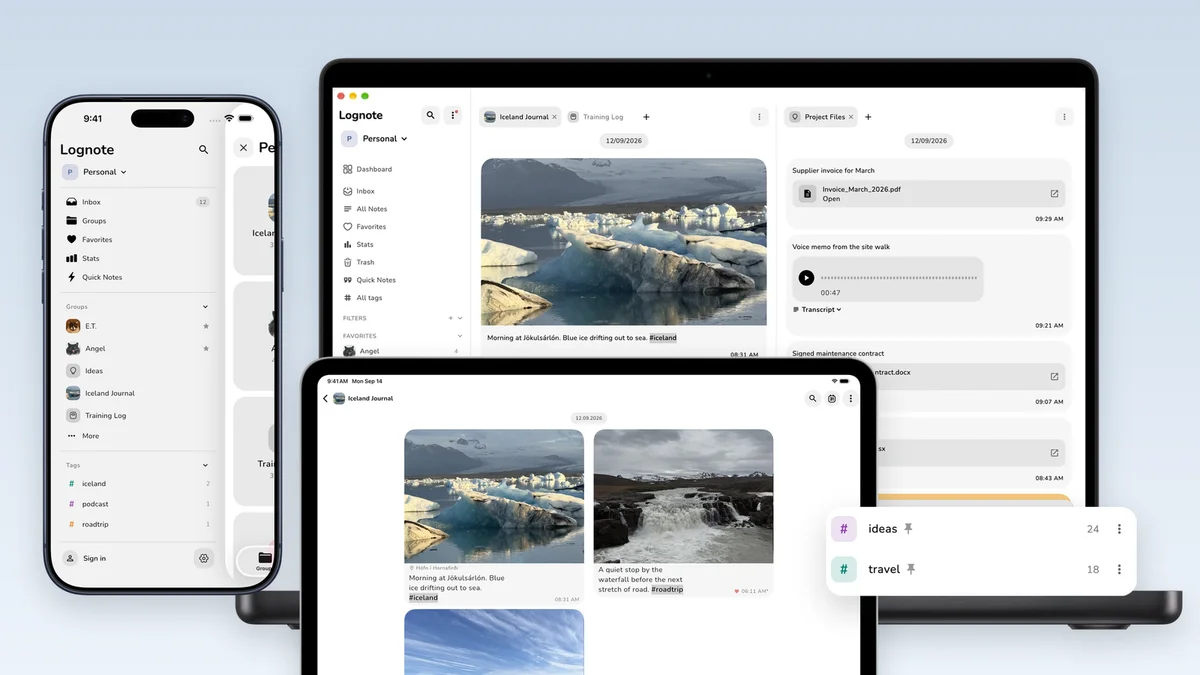
- Workspaces for Lognote Pro: Separate personal notes, work, and projects. Each workspace has its own Inbox and groups. Groups can be moved between workspaces.
- Hashtags: Add hashtags to notes, pin frequently used tags, assign colors, and search across groups. Lognote Pro can combine hashtag filters with workspaces.
- New design: Groups, notes, search, statistics, settings, controls, cards, the input bar, and empty states use the new rounder design.
- Slash commands: Open formatting and note actions directly from the editor.
- Typography and keyboard controls: Choose Nunito or the system font. Send with Enter and add a line break with Shift+Enter.
- Continuous note bubbles: When timestamps are hidden, related notes stay visually connected across day boundaries.
- Video for Lognote Pro: Attach videos, see a real thumbnail, preview them inside a note, and sync or open them on other devices.
- Larger Pro uploads: Sync files up to 200 MB.
- Search: Find multiple words in any order, search exact phrases in quotation marks, see highlighted matches and context, and search note text, file names, and voice transcripts.
- PDF export: Export German punctuation, umlauts, international characters, and embedded fonts more reliably.
- Files and clipboard: Paste images, PDFs, and supported files. Add files and media to existing notes. Documents, audio, and video are recognized and displayed more clearly.
- Lognote Pro: The new Pro overview makes plans and included features easier to compare. Lifetime Pro is available as a purchase option.
Only on iPhone
- Side menu: Open the Inbox, groups, favorites, statistics, workspaces, and hashtags from one menu.
- Sharing and Shortcuts: Select the workspace and destination separately. Destinations are shown as Workspace › Inbox or Workspace › Group.
- Inbox export: Start an export from the three dot menu in the Inbox.
- Multiple selection: Select notes and apply actions more quickly.
- Interface updates: Cards, the input bar, and empty states have been updated for the new design.
- Camera video for Lognote Pro: Hold the shutter to record, drag up to zoom, drag down again, and release to stop. Tap the shutter to take a photo. The camera shows a timer, recording indicator, and thumbnail.
- Widgets: New groups and changed group images refresh more reliably.
Only on iPad
- New iPad layout: Use a persistent sidebar and two or three columns in portrait, landscape, and Split View.
- Keyboard, mouse, and trackpad: Use pointer interactions, menus, and keyboard controls throughout the app.
- File drop: Add supported files directly with drag and drop.
- Dialogs: Dialogs stay connected to the visible workspace and use the available screen area.
- Narrow Split View: The interface remains usable when Lognote shares the screen with another app.
- Camera and media: Lognote Pro includes camera video recording. Media previews have been updated for the larger display.
- Widgets: New groups and changed group images refresh more reliably.
Only on Mac
- New Mac layout: Use a persistent sidebar and a desktop layout for larger screens.
- Tabs and Split View: Keep multiple notes and contexts open at the same time.
- List and table layouts: Choose the view that fits the current group and edit note details inline.
- Quick Composer: Create a note without opening the full app.
- Global Quick Capture: Open the composer with a system wide keyboard shortcut.
- Dialogs and popovers: Controls use layouts designed specifically for macOS.
- OpenStreetMap: Map content on the Mac now uses OpenStreetMap.
- Media and Finder files: See video thumbnails and media previews. Add supported files with paste or drag and drop.