

Review & Insights
See the time between two notes
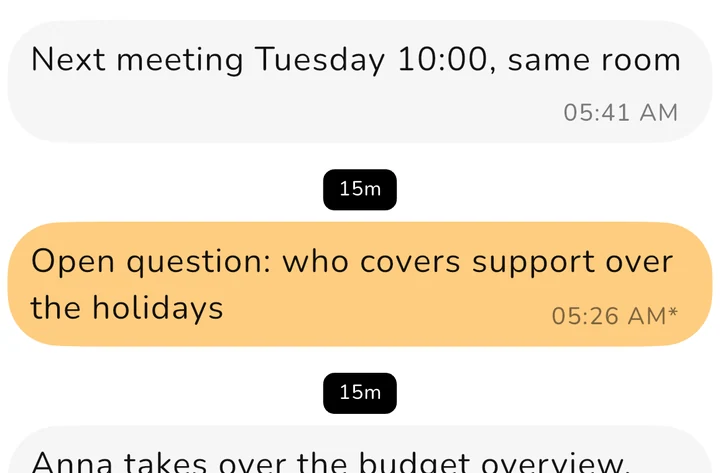
Check how much time passed between entries in a group, for example between starting a test and recording the result.

On this page
Show elapsed time
- Open a group with at least two notes.
- Open the group menu and turn on Duration.
- Read the gap between two consecutive notes. An entry at 09:10 and the next at 09:35 are 25 minutes apart.
Which entries are compared?
Lognote compares timestamps on neighboring notes in the displayed list. A filter can change which entries appear beside each other. Clear it to see the full sequence.
Turn Duration off in the same menu to hide the labels. Your notes retain their original timestamps.
Keep learning
Related articles
Show or hide timestamps
Keep time labels visible or give your content a quieter appearance. Saved timestamps remain intact.
Search and Browse Notes by Date
Search within a group or across Lognote and move through dated Inbox entries.
Browse notes in Calendar
Jump to a day and revisit its entries and attachments.
Understand Your Writing Stats
Read totals, activity patterns, priorities, and trends calculated from your notes.
Still need help?
Tell us what happened and which device you use. We’ll help you find the next step.
Contact us